- Quizzoo
- For teachers
Classroom quizzes for primary schools
Quizzoo is a free quiz game for children aged 5 to 14, with a quiz for each age from 5 to 13 and 12 topics, from times tables and spelling to flags and space. It runs in a web browser, so a classroom quiz takes no setting up.
Try a quiz nowFree to play. No sign-up, nothing to install.
- No accountsNo sign-up, no class codes and no passwords, for you or for pupils.
- No real names neededA Play link starts as Player 1. If a pupil makes a player, a nickname or a table name works.
- Nothing to installIt runs in a web browser. Open a link and the first question is on screen in seconds.
- Saved on the device onlyNames, ages and progress are saved in the browser of the device that was played on. Names, ages and answers are never sent anywhere.
- Visits counted only after a yesUntil a grown-up says yes to the cookie question, nothing is loaded from Google.
- No chatPlayers cannot message anyone, and nobody can message them.
Before it goes on the classroom screen
What is saved. A player's name, the age selected for them and their progress are saved in the web browser of the device. Nothing typed is sent anywhere, and nor is the age. If the school's devices clear the browser at log-off, progress is lost each time. A pupil who moves to another device starts again there.
Cookies. Quizzoo uses Google Analytics to count visits, and only after a grown-up says yes to the question at the bottom of the screen. Say no on a classroom computer and the game plays just the same.
Links out. The only links out of Quizzoo are two round buttons for its own Facebook page and group. In the game they sit at the foot of the Welcome and Home screens and in the Grown-ups area. Nothing leads out of the site during a round or on a results screen.
The detail. The About page says exactly what is saved, what is counted, and what the company that hosts the site can see.
Ways to use it in class
A round started by a Play link is ten questions. A quiz on one topic can be shorter where the game has fewer than ten things to ask at the player's age, and a player who has picked no age is asked as an eight year old. Each idea below starts from something that is in the game today.
- Starter
The Daily Challenge on the board
Ten questions made for the player's age, the same ten that day for everyone of that age, with no timer. Put it up as the class comes in and take each answer by a show of hands.
How: open Quizzoo, make one player for the class, select the class's age and press Play today's 10 on the Home screen. It is one go a day for each player. New questions arrive at midnight.
- Plenary
Ten quick questions on one thing
A Play link starts a round on one thing straight away: one times table, one spelling list, one maths level, or the flags, capitals or map of one continent.
How: pick a link, put it on the board and let the class call the answers. The first time, the game makes a player called Player 1, so there is nothing to set up.
- Wet play
Party Mode for two to six
Two to six players share one device and take turns. Everyone plays at their own level, Easy, Medium, Hard or Expert, and a right answer scores the same on every level, so Easy can beat Expert.
How: on the Home screen press Party Mode, add the players by name, then choose one topic or a mix and five or ten questions each. On the classroom screen, six tables can play as six teams.
- Friday quiz
A class quiz in five rounds
The pages for mixed ages are set out in five rounds by subject. Every answer is on the page, and questions are marked with the age they are set for. Read them out to teams, or press Play and the game mixes the three ages.
- Early finishers
Practice that brings mistakes back
On a classroom tablet or laptop a pupil can play one table or one spelling list alone. The game remembers what that player got wrong and brings it back until it sticks, under Practise my mistakes on the Home screen.
This only works if the pupil uses the same device each time, and if the school's devices do not clear the browser at log-off.
How: give each pupil their own player on the device, up to six. A nickname works. For paper, print a sheet.
How it lines up with school years
Each age quiz is pitched at a school year in England, from Reception to Year 8. For each year the table gives that quiz, the maths levels it draws on, the spelling list for the year, the times tables children in England learn in it, and a sheet to print. Years 7 and 8 have no spelling list of their own, so they get the hardest one.
A link for an age, a maths level or a spelling list always plays at that level. A link for a times table asks only that table.
| School year | Age quiz | Maths | Spelling list | Times tables | To print |
|---|---|---|---|---|---|
| Reception | Not yet | Not yet | |||
| Year 1 | Not yet | ||||
| Year 2 | |||||
| Year 3 | |||||
| Year 4 | |||||
| Year 5 | |||||
| Year 6 | |||||
| Year 7 | |||||
| Year 8 |
A gold button is a Play link. It starts that quiz in the game straight away.
An age quiz follows its school year more closely than a maths level does. The quiz for 5 year olds keeps its sums and its counting within 10. The quiz for 8 year olds asks level 3 with the 3, 4 and 8 times tables and three-digit numbers, and leaves rounding to Year 4. The quiz for 10 year olds asks level 4 as fractions and decimals, and leaves percentages to Year 6. A link for a maths level asks the whole level.
Maths levels
- Level 1: counting and first sums.
- Level 2: adding and taking away to 100.
- Level 3: place value, rounding and missing numbers.
- Level 4: fractions, percentages, decimals and negative numbers.
- Level 5: fast mental maths.
Times tables
Children in England learn the 2, 5 and 10 times tables first, in Year 2. The 3, 4 and 8 are added in Year 3. By the end of Year 4 children are expected to know every table up to 12 times 12.
Spelling
The words come from the lists in the national curriculum in England. The game tests 63 words from the Years 1 and 2 list, 60 from the Years 3 and 4 list and 72 from the Years 5 and 6 list. In the game a pupil aged 8 or over hears each word and types it, and a younger player picks the right spelling from four. The spelling page shows every word.
Printable sheets
Each sheet is two PDFs of one A4 page each. The question sheet has a line for a name and a date, and room to write. The answer sheet has each answer in the same place as its question, for quick marking, then the line of explanation the game gives.
For a class, print the question sheet for each pupil and the answer sheet once.
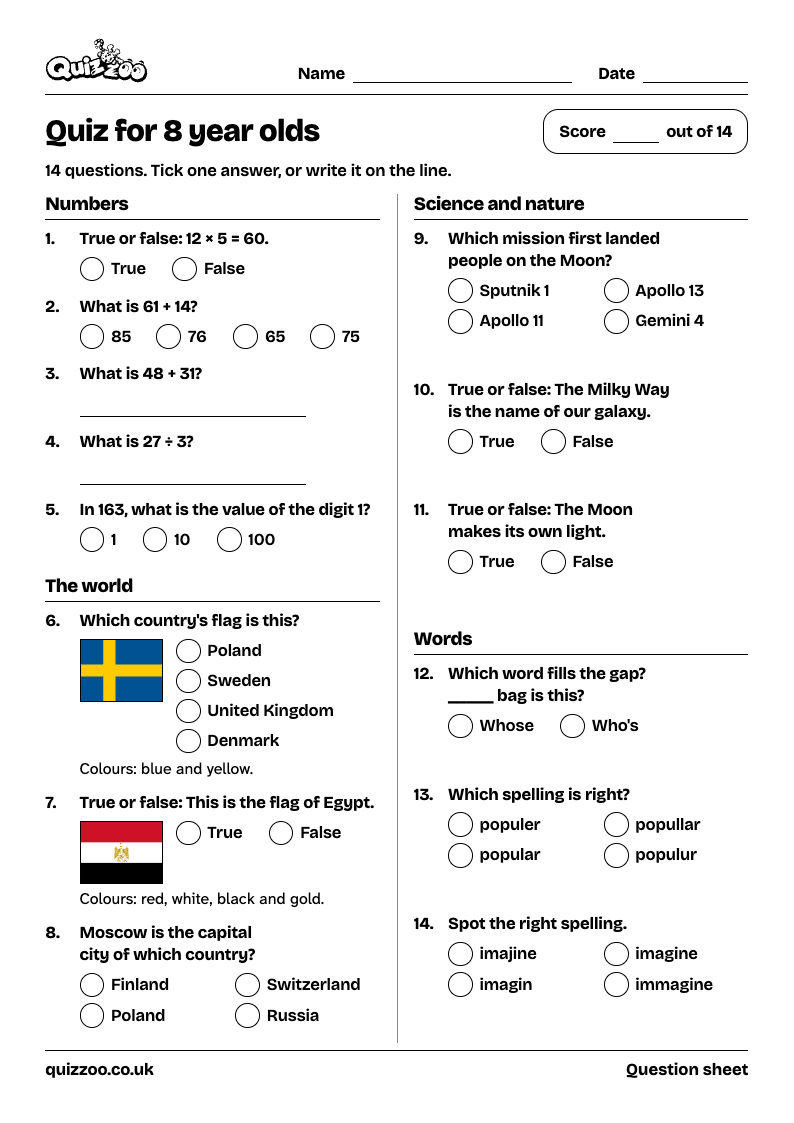
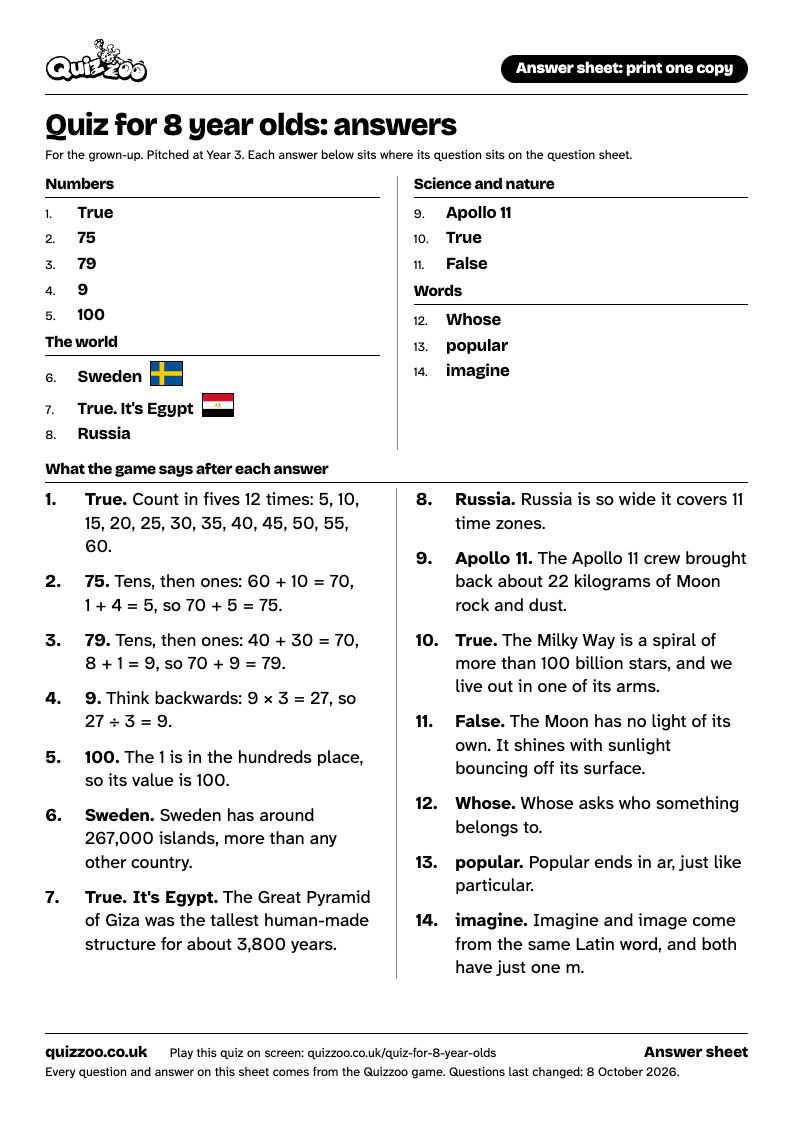
- Quiz for 8 year oldsYear 3, 14 questionsQuestions: Quiz for 8 year olds, PDF, 1 pageAnswers: Quiz for 8 year olds, PDF, 1 page
- Times tables practiceAll tables, 2 to 12, 33 questionsQuestions: Times tables practice, PDF, 1 pageAnswers: Times tables practice, PDF, 1 page
All printable sheets, by year and by topic
The sheets are clear on a black and white printer, and every question on them comes from the Quizzoo game. A sheet named after a page of questions carries questions from that page. Every page of questions also prints on A4 from the browser's own Print command, with the questions first and the answers on a separate sheet.
How the answers are checked
A wrong answer taught to a child is the worst mistake a quiz can make. So each of the 12 topics has been through three rounds of checking, the latest in October 2026, and automatic tests run before every release. The tests check that a question has exactly one right answer, that no choice appears twice, and that a round does not ask about the same thing twice. A picture beside a question must never give the answer away.
No check catches everything. The About page names the sources and says how to report a mistake.
Questions teachers ask
Do pupils need accounts, logins or a class code?
No. There is no sign-up, no email address and no password, for you or for them. A Play link starts a quiz straight away. The first time, the game makes a player called Player 1, and the name can be changed at any time.
How do I change a player's age?
On the Home screen, press the player's character at the top, then View profile, then Edit. Under Select your age, press the new age, then press Save. Every round started after that fits the new age.
Can I see each pupil's results?
Not from your own computer. Quizzoo has no teacher dashboard and no reports. Progress is saved only in the browser of the device a pupil played on. On that device, the Grown-ups area shows each player's accuracy by topic, the time played and what needs practice.
Does it follow the national curriculum?
In part. The spelling words come from the lists in the national curriculum in England, and the times tables are grouped by the year in which children in England learn them. Flags, capitals, space, dinosaurs and the other topics are general knowledge. They are not mapped to curriculum objectives.
Is it the Year 4 multiplication tables check?
No. Quizzoo is not that check and does not copy it. It is a calm way to practise the same facts, with no clock unless you want one.
Can the words be made bigger for the board?
Yes. Settings has four text sizes, from Small to Extra large, and a dyslexia-friendly font. A change applies straight away, for everyone who plays on that device.
Is there sound?
There are sound effects for taps, right answers and streaks, and music stays off unless you choose it. Sound effects switch off in Settings or in the pause menu of a round. Settings also has a dark theme and a switch for reading each question aloud in the voice built into the device.
What does it cost?
Quizzoo is free to play. To pay for its upkeep it may one day carry adverts suitable for children, or offer optional plans for families or schools.
What if I spot a wrong answer?
Please say so on the Quizzoo Facebook page. The round Facebook button at the foot of this page leads there. Facebook is for grown-ups: it does not allow anyone under 13 to have an account.